

💬 AI Mode now matches your tone of voice
With the new Tone of Voice setting for AI Mode, you choose how AI Mode sounds in every conversation. Adjust the level of formality, add custom instructions, and share example texts so AI Mode consistently matches your brand voice — giving customers a more on-brand shopping experience.
With Tone of Voice instructions, you stay in control of how AI Mode communicates: from formal to informal, and everything in between. This keeps your brand voice consistent across customer interactions and helps create a more trusted shopping experience.
You can take it as far as you want ;-)

How it works
You can control AI Mode’s tone of voice by giving it language instructions and example texts.
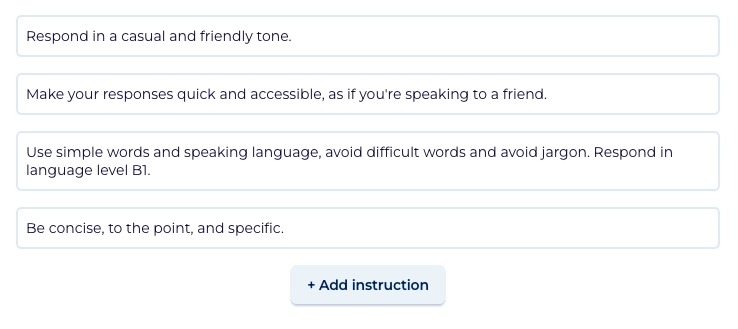
- Write custom instructions: Add up to 10 short, plain-language rules that instruct AI Mode how to communicate. For example: "Always use formal language," "Keep answers short and to the point," or "Avoid exclamation marks."
- Provide example texts: Optionally, include up to 3 real texts that reflect your tone of voice best: for example product descriptions, chat replies, news letters, or social posts. This shows AI Mode how you want to it to communicate. The closer they match your style and instructions, the better AI Mode will sound.
Get started
Follow the steps below to customize AI Mode’s tone of voice right away.
- Go to the AI Mode settings in the App settings.
- Find the new Tone of Voice section.
- Choose ‘Custom tone of voice instructions’
- Edit the suggested instructions or add your own instructions describing how AI Mode should communicate. Keep each instruction focused on one aspect (e.g., formality, sentence length, personality). This can be done in English or the app language.
- Optional: Paste up to 3 example texts that capture your brand voice. Make sure to use the language of the app for the example text.
- Save your settings.
- Try AI Mode in preview to check if the tone of voice is correct. If not, try making the instructions more specific or add an example.
- Don't forget to publish your app!
We’re seeing more and more shops launch with AI Mode, and we’d love to hear about your experience. This feature is the result of the first round of feedback on AI Mode. So let us know if you have ideas to further improve AI Mode!
Own the advice layer before someone else does.
Shoppers are going to ask AI what to buy. Make sure your brand has the answer.
